oray
  • Products
  • Solutions
  • Downloads
  • Pricing
  • Resources
  • Become a partner
  • Products
  • Solutions
  • Downloads
  • Pricing
  • Resources
  • Become a partner
More
Products
  • AweSun Remote Desktop Control
  • AweSeed Intelligente Networking
  • AweShell NAT Traversal Expert
Solutions
  • IT Operations & Support
  • Remote Work
  • Technical Support
  • Industrial IoT
  • Video Surveillance
  • Remote Data Access
  • Industrial manufacturing
  • Chain retail
Downloads
  • AweSun Personal Edition
  • AweSeed Client
  • AweShell Client
Pricing
  • AweSun Personal Plan
  • AweSeed Business Plan
  • AweShell Personal Plan
  • AweShell Business Plan
Resources
  • Resources
Become a partner
  • Become a partner
More
i18n
arrow
AI-translated page. Original content available in English.
Contact Us
Smart Hardware

AweSun

  • AweSun
  • AweSeed
  • AweShell
  • Account
Search for this product
Search all.
  • Search all documents

Quick Start

Individual user

How do I initiate Remote Assistance with an identification code?

Unattended access your computer

What is a channel connection

Awesun Safety Remote Control Tutorial

FAQ

Toolkit use details

Operation Help

Software application

Desktop application

How to Remote Files on Computer

登录向日葵需要开放哪些端口

USBIP mapping

Cloud storage

Privacy screen

Multi-screen control Multi-screen

Handle Mapping

Intelligent hardware

Power-on hardware

Power-on socket/patch panel FAQ

Remote control without network

Resolution and refresh frequency supported by intelligent remote control devices

How to use intelligent remote control equipment remote boot

Common problems of intelligent remote control equipment

Software Manual

Windows

Windows personal edition manual

Android & iOS

Control terminal Android version manual

Control terminal iOS version manual

User Manual of AweSun Host for Android

Intelligent hardware

Other

Intelligent remote control mouse (Bluetooth version) manual

Power on socket C2 manual

Case Center

Scenario Case

Telecommuting

Awesun Helps Huawei Improve Collaboration Efficiency

Industry Cases

IT Internet

How do well-known game manufacturers build internal remote assistance systems with the help of Aweray Awesun?

Smart Transportation

Soft and hard integrated solution to build intranet operation and maintenance, Aweray Awesun privatization deployment empowers Zhejiang Zhongche.

Intelligent Manufacturing

How to build an efficient cross-border remote technical support system when the manufacturing industry is out to sea?

Solution

IT Operation and Maintenance

Support ZTE's new fulcrum server operating system to Aweray the localization of Awesun empowerment.

How does the first-line commercial equipment operate efficiently? Starting from these four aspects

How can enterprises quickly build a remote IT operation and maintenance system to deal with holiday business?

Tips for remote IT management: How to group a large number of IT equipment? How to set up fast grouping?

To deal with the four major problems of chain operation and maintenance, Aweray Awesun IT operation and maintenance solutions to empower the chain retail industry.

Telecommuting

The Dragon Boat Festival holiday business is not interrupted, and the enterprise telecommuting plan is deployed in three steps.

Deal with these three pain points, 'painless' to build enterprise telecommuting system

After the telecommuting system is set up, how to manage IT assets in an enterprise in a unified way?

Technical Support

No longer piecemeal, how do enterprises build platform-based technical support services?

Efficient assistance, professional image, customer-oriented! Three aspects to build enterprise technical support professional reputation

How to ensure the security of remote control business? Analysis of the "whole process safety closed loop" system of Aweray Awesun

 


Cancel

Back to Home Page

Quick Start

 

Individual user

 

How do I initiate Remote Assistance with an identification code?

 

Unattended access your computer

 

What is a channel connection

 

Awesun Safety Remote Control Tutorial

 

FAQ

 

Toolkit use details

 

Operation Help

 

Software application

 

Desktop application

 

How to Remote Files on Computer

 

登录向日葵需要开放哪些端口

 

USBIP mapping

 

Cloud storage

 

Privacy screen

 

Multi-screen control Multi-screen

 

Handle Mapping

 

Intelligent hardware

 

Power-on hardware

 

Power-on socket/patch panel FAQ

 

Remote control without network

 

Resolution and refresh frequency supported by intelligent remote control devices

 

How to use intelligent remote control equipment remote boot

 

Common problems of intelligent remote control equipment

 

Software Manual

 

Windows

 

Windows personal edition manual

 

Android & iOS

 

Control terminal Android version manual

 

Control terminal iOS version manual

 

User Manual of AweSun Host for Android

 

Intelligent hardware

 

Other

 

Intelligent remote control mouse (Bluetooth version) manual

 

Power on socket C2 manual

 

Case Center

 

Scenario Case

 

Telecommuting

 

Awesun Helps Huawei Improve Collaboration Efficiency

 

Industry Cases

 

IT Internet

 

How do well-known game manufacturers build internal remote assistance systems with the help of Aweray Awesun?

 

Smart Transportation

 

Soft and hard integrated solution to build intranet operation and maintenance, Aweray Awesun privatization deployment empowers Zhejiang Zhongche.

 

Intelligent Manufacturing

 

How to build an efficient cross-border remote technical support system when the manufacturing industry is out to sea?

 

Solution

 

IT Operation and Maintenance

 

Support ZTE's new fulcrum server operating system to Aweray the localization of Awesun empowerment.

 

How does the first-line commercial equipment operate efficiently? Starting from these four aspects

 

How can enterprises quickly build a remote IT operation and maintenance system to deal with holiday business?

 

Tips for remote IT management: How to group a large number of IT equipment? How to set up fast grouping?

 

To deal with the four major problems of chain operation and maintenance, Aweray Awesun IT operation and maintenance solutions to empower the chain retail industry.

 

Telecommuting

 

The Dragon Boat Festival holiday business is not interrupted, and the enterprise telecommuting plan is deployed in three steps.

 

Deal with these three pain points, 'painless' to build enterprise telecommuting system

 

After the telecommuting system is set up, how to manage IT assets in an enterprise in a unified way?

 

Technical Support

 

No longer piecemeal, how do enterprises build platform-based technical support services?

 

Efficient assistance, professional image, customer-oriented! Three aspects to build enterprise technical support professional reputation

 

How to ensure the security of remote control business? Analysis of the "whole process safety closed loop" system of Aweray Awesun

 

Search for this product

Search all.

Home Page AweSun Remote Software Easy Remote Access Software: Simplifying Remote Work and IT Maintenance

Easy Remote Access Software: Simplifying Remote Work and IT Maintenance

Update Date:2026-04-02 03:10:20

In the modern digital age, remote work and access to technology from anywhere have become increasingly important. Whether you are a professional on the go or a gamer looking to stream sessions from a distant location, having a reliable and user-friendly remote access software is essential. AweSun, developed by the innovative SaaS company AweRay Pte. Ltd., has emerged as a leading solution in this domain. Established in 2006, AweSun has been downloaded by over 100 million users worldwide, making it a trusted choice for individuals and businesses alike .

Introduction to AweSun

AweSun is a versatile remote control software that facilitates seamless access to computers and mobile devices. Whether you need to control a remote PC from your smartphone or transfer files between devices, AweSun offers a comprehensive suite of features to make your remote tasks as smooth and efficient as possible. The software supports multiple platforms, including Windows, macOS, Linux, and mobile devices such as iOS and Android, ensuring that you can work on the go without any compatibility issues .

Multi-platform Support

One of the standout features of AweSun is its multi-platform support. You can control a remote PC from another PC or from a mobile device, providing flexibility in how you work and manage your technology. This feature is particularly useful for professionals who need to access their work computers while traveling or working from home. With AweSun, the transition from one device to another is seamless, allowing you to maintain productivity regardless of your location .

Remote File Transfer

Another essential feature of AweSun is its robust support for remote file transfer. Users can easily copy, paste, or drag and drop files between their local and remote devices. This capability is invaluable for tasks such as sharing documents, transferring large files, or backing up important data. AweSun's intuitive interface makes these operations straightforward, even for those who are new to remote access software .

Multi-screen Control

For users with multiple monitors, AweSun's multi-screen control feature is a game-changer. It allows you to simultaneously control all the screens of the remote PC, enhancing the efficiency of your remote work. This feature is particularly useful for graphic designers, developers, and anyone who relies on a multi-monitor setup to complete their tasks. By mirroring your local setup on the remote PC, AweSun ensures that your workflow remains consistent and streamlined .

Remote IT Maintenance

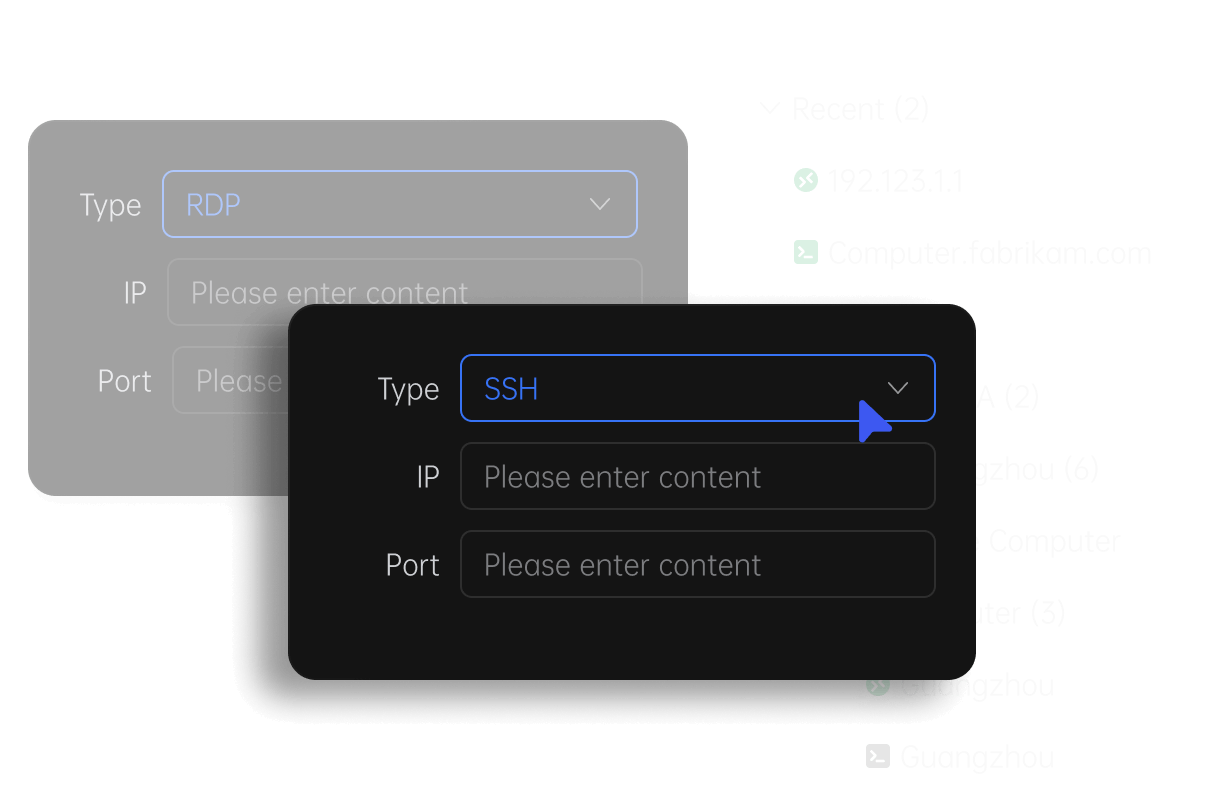
AweSun is not just a tool for remote work; it is also a powerful solution for remote IT maintenance. IT professionals can use the software to manage and troubleshoot remote systems, eliminating the need for physical presence and reducing travel time and costs. AweSun supports multiple protocols, including RDP (Remote Desktop Protocol) and SSH (Secure Shell), making it a versatile tool for IT administrators and support teams .

Clear and Intuitive Interface

One of the key aspects that make AweSun easy to use is its clear and intuitive interface. The software provides a user-friendly environment that simplifies the management of all remote desktop sessions. IT professionals and casual users alike can navigate through the software's features with ease, making remote maintenance and access tasks more efficient and less stressful. The interface is designed to be intuitive, with a focus on user experience and functionality .
Security and Reliability

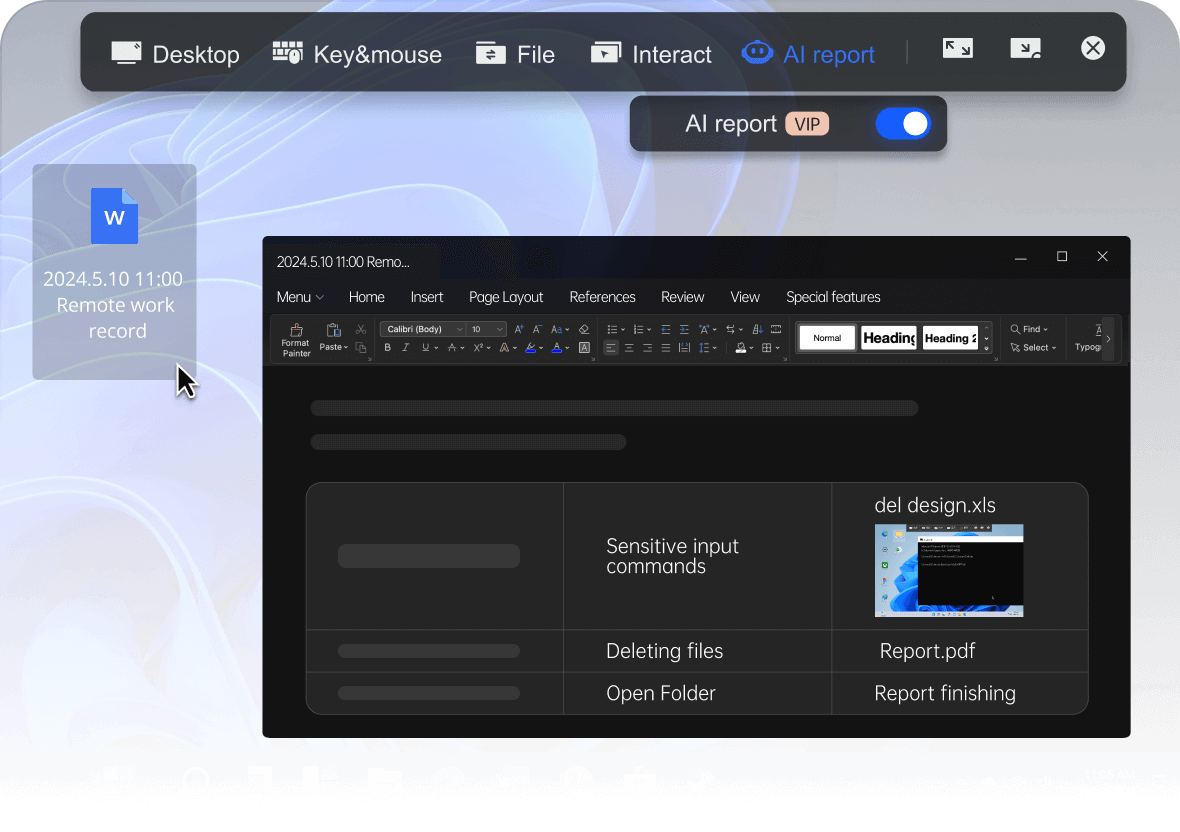
Security is a paramount concern in remote access software, and AweSun does not compromise in this area. The software uses advanced encryption protocols to ensure that all data transmitted between devices is secure and protected from unauthorized access. This is crucial for businesses that handle sensitive information and need to comply with stringent data protection regulations. AweSun's reliability is also a significant factor, as it ensures that remote connections are stable and uninterrupted, providing a seamless user experience .
Use Cases and Benefits

Remote Work

For remote workers, AweSun offers a reliable and efficient solution to access their office computers from anywhere. Whether you are working from home, traveling, or on a business trip, AweSun ensures that you can maintain the same level of productivity as if you were in the office. The multi-platform support and intuitive interface make it easy to switch between devices, and the remote file transfer capabilities facilitate seamless collaboration and file sharing .

Gaming

Gamers can use AweSun to stream their gaming sessions from a remote PC to their local device. This is particularly useful for those who want to play resource-intensive games on their powerful gaming rig while using a less capable device. AweSun's stable and high-performance remote connections ensure that your gaming experience is smooth and enjoyable, without lag or interruptions .

IT Support and Maintenance

IT professionals find AweSun invaluable for managing and maintaining remote systems. The multi-protocol support and clear interface allow for efficient troubleshooting and system management. Whether it's resolving software issues, updating applications, or performing routine maintenance, AweSun streamlines the process and reduces the time and resources needed to handle these tasks .

Business Continuity

For businesses, AweSun is an essential tool for ensuring continuity in operations. It allows employees to access critical systems and data from any location, which is particularly useful during unexpected events such as natural disasters or pandemics. By enabling remote access and collaboration, AweSun helps businesses stay operational and responsive, even when physical offices are inaccessible .

Conclusion

AweSun is a comprehensive and user-friendly remote access software that addresses the needs of remote workers, gamers, and IT professionals. With its multi-platform support, robust file transfer capabilities, and intuitive interface, AweSun ensures that you can work and manage your technology efficiently from anywhere. Its security features and reliability make it a trusted choice for businesses and individuals who require a seamless and secure remote access solution. Whether you are looking to enhance your remote work capabilities or streamline your IT maintenance tasks, AweSun is a valuable tool that can help you achieve your goals .

FAQ

Q:What is AweSun and who developed it? A:AweSun is a remote control software developed by AweRay Pte. Ltd., an innovative SaaS company. It was established in 2006 and has since been downloaded by over 100 million users worldwide, making it a trusted choice for remote access and control.

Q:Which platforms does AweSun support? A:AweSun supports multiple platforms, including Windows, macOS, Linux, and mobile devices such as iOS and Android. This multi-platform support ensures that you can control a remote PC from another PC or from a mobile device, providing flexibility in how you work and manage your technology.

Q:Can I transfer files using AweSun? A:Yes, AweSun offers robust support for remote file transfer. Users can easily copy, paste, or drag and drop files between their local and remote devices. This feature is invaluable for tasks such as sharing documents, transferring large files, or backing up important data.

Q:How does AweSun handle multi-screen setups? A:AweSun allows you to simultaneously control all the screens of the remote PC, which is particularly useful for graphic designers, developers, and anyone who relies on a multi-monitor setup. By mirroring your local setup on the remote PC, AweSun ensures that your workflow remains consistent and streamlined.

Q:Is AweSun suitable for IT maintenance? A:Absolutely. AweSun is a powerful solution for remote IT maintenance. IT professionals can use the software to manage and troubleshoot remote systems, eliminating the need for physical presence and reducing travel time and costs. AweSun supports multiple protocols, including RDP and SSH, making it a versatile tool for IT administrators and support teams.

Q:How secure is AweSun? A:AweSun uses advanced encryption protocols to ensure that all data transmitted between devices is secure and protected from unauthorized access. This is crucial for businesses that handle sensitive information and need to comply with stringent data protection regulations. AweSun's reliability ensures that remote connections are stable and uninterrupted, providing a seamless user experience.

Q:Can AweSun be used for remote gaming? A:Yes, AweSun can be used to stream gaming sessions from a remote PC to a local device. This is particularly useful for gamers who want to play resource-intensive games on their powerful gaming rig while using a less capable device. AweSun's stable and high-performance remote connections ensure that your gaming experience is smooth and enjoyable, without lag or interruptions.

Previous article:

Free Remote PC ...

Next:

A Comprehensive...

Did the content of the document help you?

Yes
No

If you encounter product-related problems, you can consult Online customer service Ask for help.

Document Feedback

Mouse selected content, quick feedback problem

If you have doubts in the selected document, you can quickly feedback the problem and we will follow up.

Example:

Dandelion Router

In the router management interface,In the router management interface,

①DHCP:ON;

② IP address range: fill in the start and end address segments;

Document Feedback  Document Feedback

Okay, I got it

Related issues

· Top 5 Best Free Screen Mirroring Apps in 2026 (Lag-Free & Cross-Platform)· Secure Remote Desktop Software: Enhancing Productivity and Security· The Evolution of PC-to-PC Remote Access Software· The Most Secure Remote Desktop Software: A Comprehensive Guide· The Importance of Safe Remote Access Software· The Benefits of Free Remote Control Software: A Comprehensive Guide

Other issues

· AweSun for Windows: Simplifying Remote Control for Modern Businesses· Understanding Remote Desktop Port: A Gateway to Seamless Remote Access· A Comprehensive Guide to Business Remote Desktop Software· The Power of Mac Remote Control: Enhancing Productivity and Effortlessly Managing Multiple Devices· Remote Desktop Access: Linux to Linux· The Evolution and Importance of Remote Control Programs
Document Feedback

Introduction to this article

Introduction to AweSun

Multi-platform Support

Remote IT Maintenance

Use Cases and Benefits

Conclusion

FAQ

Product Purchase
  • AweSun
  • AweSeed
  • AweShell
  • Smart Hardware
Downloads
  • AweSun Client
  • AweSeed Client
  • AweShell Client
Solutions
  • IT Operations & Support
  • Remote Work
  • Technical Support
  • Industrial IoT
  • Video Surveillance
  • Remote Data Access
Buy Now
  • AweSun Personal Plan
  • AweSeed Business Plan
  • AweShell Personal Plan
  • AweShell Business Plan
  • Redeem Code
Support
  • Contact customer service
  • Resources
  • Blog
Company
  • About us
  • Become a partner
  • Privacy Policy
  • Terms of Use
  • Cookies Policy
Copyright ©2026 AweRay PTE All Rights Reserved.
Product Purchase
  • AweSun
  • AweSeed
  • AweShell
  • Smart Hardware
Downloads
  • AweSun Client
  • AweSeed Client
  • AweShell Client
Solutions
  • IT Operations & Support
  • Remote Work
  • Technical Support
  • Industrial IoT
  • Video Surveillance
  • Remote Data Access
Buy Now
  • AweSun Personal Plan
  • AweSeed Business Plan
  • AweShell Personal Plan
  • AweShell Business Plan
  • Redeem Code
Support
  • Contact customer service
  • Resources
  • Blog
Company
  • About us
  • Become a partner
  • Privacy Policy
  • Terms of Use
  • Cookies Policy
Copyright ©2026 AweRay PTE All Rights Reserved.